01
One ontology to read from.
Your connected systems feed one set of typed records. Every screen and program reads them through a named SQL query, with each role’s access applied.
- Object types
- Relationships
- Connectors
- Queries · SQL
You have an ERP, spreadsheets, a few scripts, and a coding agent you wouldn’t give write access to any of them. LineSide gives that agent your ontology and your process map to read: what your records are, and how the work runs. Everything it builds goes on a branch you review.
Claude Code, Codex and any client that speaks Streamable HTTP with OAuth connect over MCP.
$ claude mcp add --transport http lineside https://<your workspace>/mcp/agents/<agent id>$ claude> Add a screen that lists purchase order lines past their due date, with an Expedite button on each line.At a machining and stamping plant on SAP Business One, 81% of open purchase-order lines were past due when we queried its live workspace on 13 October 2026. This is a screen for that list. We wrote the example for this page. Then Claude Code made the change over the connector on 25 November 2026, in a copy of that plant’s workspace with the names in its records masked. Steps 01 to 05 show what the platform returned. The run stopped before publication, so steps 06 and 07 describe what comes next.
01
Each field in the ontology carries a written meaning. Each step on the map says what starts it, who does it and what already serves it. This plant’s map has 34 steps. One is the buyer following up with suppliers on delivery dates, and it already has a screen, Procurement Tracking. The map also reports seven links that have gone dead.
lineside · view_ontology_object_type · get_os_context_graph
PurchaseOrderLine · 33 fields · 21 relationships
  open_quantity  float      Unfulfilled commercial quantity in this
                            line's unit_of_measure, on the same basis
                            as quantity.
  due_date       timestamp
  PurchaseOrderLineBelongsToPurchaseOrder  →  PurchaseOrder
  PurchaseOrderLineBelongsToItem           →  Item

PurchaseOrder · 32 fields · 4 relationships
  document_number     string   SAP purchase document number for
                               display and external reference.
  expedite_requested  boolean  Whether expedited turnaround was
                               requested on this document.
PurchaseOrderBelongsToSupplier → SupplierPROCESS Plant operating map [v41, active] subjects: unanchored
NODE supplier_change [event: external] Supplier changes or misses delivery
NODE supplier_followup [work] Follow up with suppliers on delivery dates role: Buyer
METHOD [human_performs, ] role: Buyer
roots: view:Procurement Tracking, action:RecordSupplierFollowUp
view:Procurement Tracking contributes: Lists the suppliers and lines to follow up and why, and records each line's update in a popup.
action:RecordSupplierFollowUp contributes: Saves a purchase line's supplier contact with its new delivery dates.
FLOW supplier_change -[then]-> supplier_followup
FLOW supplier_followup -[informs]-> requirements
MAP DRIFT (7 finding(s); whoever changes what runs fixes the map in the same branch)
dead link: Plant operating map / Convert recommendations into purchase orders -> automation:Buyer Purchase Conversion02
The query is the only way the screen reads, and each role’s access applies to it. The Action is the only way it writes. All three arrive in one call. The agent made the screen visible to the Buyer role, the role the map names for this step.
lineside · apply_os_branch_changeset
data_retrieval_contract/LateLines/
├─ definition.json
├─ description.md
├─ contract.json
└─ selects/lines.sql
action/Expedite/
└─ definition.json
view/Late-supplier-lines/
├─ definition.json
├─ description.md
├─ view.json
└─ src/App.tsximport { DataTable, FilterBar, useFilters } from '@lineside/view-blocks';
export default function App() {
const filters = useFilters('lines', {
due: { kind: 'date_range', column: 'due_date', default: 'overdue' },
supplier: { kind: 'select', column: 'supplier_name' },
q: { kind: 'search', columns: ['po_number', 'item_code'] },
});
return (
<main style={{ padding: 24 }}>
<h1>Late supplier lines</h1>
<FilterBar filters={filters} />
<DataTable
source="lines" filters={filters} rowKey="id" title="Lines"
columns={[
'po_number',
{ key: 'supplier_name', label: 'Supplier' },
{ key: 'due_date', as: 'date' },
{ key: 'open_qty', label: 'Open', align: 'end' },
]}
rowActions={[{
action: 'expedite', label: 'Expedite',
input: (row) => ({ order_id: row.order_id }),
}]}
/>
</main>
);
}SELECT l.id AS id,
po.id AS order_id,
po.document_number AS po_number,
i.part_no AS item_code,
s.supplier_name AS supplier_name,
l.due_date AS due_date,
l.open_quantity AS open_qty
FROM "PurchaseOrderLine" l
JOIN "PurchaseOrderLineBelongsToPurchaseOrder" lp ON lp.from_object_id = l.id
JOIN "PurchaseOrder" po ON po.id = lp.to_object_id
JOIN "PurchaseOrderBelongsToSupplier" ps ON ps.from_object_id = po.id
JOIN "Supplier" s ON s.id = ps.to_object_id
JOIN "PurchaseOrderLineBelongsToItem" li ON li.from_object_id = l.id
JOIN "Item" i ON i.id = li.to_object_id
WHERE l.open_quantity > 0
AND l.due_date IS NOT NULL
ORDER BY l.due_date{
"name": "Expedite",
"description": "Mark a purchase order as needing expedited delivery from its supplier.",
"input_schema": {
"type": "object",
"required": ["order_id"],
"properties": {
"order_id": { "type": "string", "title": "Purchase order", "x-object-type-name": "PurchaseOrder" }
}
},
"execution_schema": {
"version": "ontology_action_v2",
"preconditions": [],
"mutation": {
"kind": "ontology_write_plan",
"writes": [
{ "op": "update_object", "object": "PurchaseOrder", "id": "input.order_id",
"fields": { "expedite_requested": true } }
]
}
}
}03
The query’s names are checked against the ontology, and the screen’s types are generated from the query’s columns. We wrote the column on line 20 as open_quantity, on purpose. The build names the seven columns that exist, and a failed build stages nothing.
lineside · apply_os_branch_changeset
view/Late-supplier-lines: patch_view_schema: The patched code View failed to build; no changes were applied.
- view/Late-supplier-lines/src/App.tsx:20:13 TS2322: Type '"open_quantity"' is not assignable to type '"id" | "order_id" | "due_date" | "supplier_name" | "po_number" | "item_code" | "open_qty"'.04
The platform renders the screen on rows it generates from the query’s columns, never on live data, and returns the image with any runtime errors. This is that image, with the empty space below the table cut off.
lineside · apply_os_branch_changeset
"status": "rendered",
"runtime_errors": [],
"console_errors": [],
"sources_not_read": []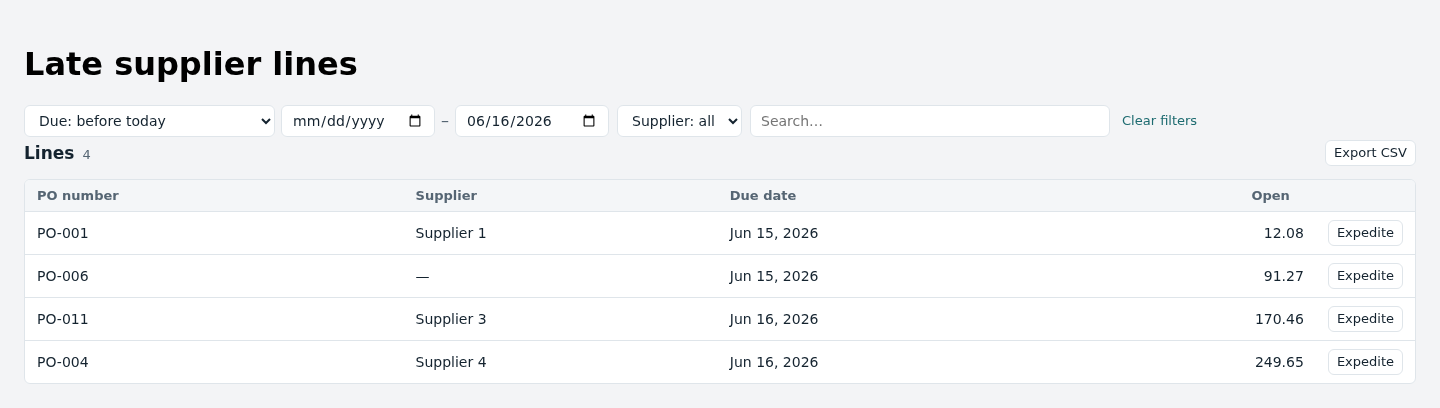
05
The map is edited on the same branch as the screen, so the two are reviewed together. The platform then checks the whole branch. This one passed and added no map warnings.
lineside · create_operational_process_version · update_activity_bindings · prepare_os_revision
{ "artifact_ref": { "kind": "action", "id": "86263da5-…" },
  "contribution": "Marks a late line's purchase order for expedited delivery." }

"activity_stable_key": "supplier_followup",
"changed_fields": ["capability_links"],
"message": "Activity bindings staged in the active OS Branch.""validation": { "valid": true, "status": "passed", "error_count": 0, "warning_count": 0 },
"map_warnings": { "introduced_count": 0, "resolved_count": 0 }06NOT PART OF THIS RUN
Publication waits for your approval by default. Live is unchanged.
lineside · commit_os_revision · publish_os_revision
"publication_mode": "require_approval",
"approval_handling": "mcp_review"07NOT PART OF THIS RUN
The review opens the screen on the branch over your own records. Its Expedite button starts working at publication, because a new screen gets its authority to write when it is published. You approve in LineSide, or on a card in clients that show one; nothing the agent says counts as approval. What goes live is a revision with its author and approval on record.
01
Your connected systems feed one set of typed records. Every screen and program reads them through a named SQL query, with each role’s access applied.
02
Each step names what starts it, who does it and the Actions, Programs or Agent that perform it. Checkpoints on the map run on a clock and tell people what is still open.
03
A person changes a record through an Action, which is typed, checked and recorded with who did it. Programs stage their writes and publish them together. Connectors start read-only. Writing back to your ERP needs a connector definition you approve, naming each operation it may perform; so far that has run against a SAP Business One test company.
04
A new screen, query, program, automation or map step lands on a branch. Change a query in a change set and every screen that reads it is type-checked against it; if one no longer builds, the change is refused. None of them goes live without publication.
| Palantir Foundry | LineSide |
|---|---|
| Ontology: object types, link types | Ontology: object types, relationships, attributes |
| Machinery | Process map: steps, events and checkpoints, each step naming who and what performs it |
| Action types | Actions, run by people from a screen |
| Functions | Programs, in Python |
| Workshop | Screens, as code your agent writes in React and TypeScript |
| Roles | Role access by object type, applied to every query |
| Data Connection | Connectors and feeds |
| Automate | Automations |
| AIP Agents | Agents: ours, and your own over MCP |
| Branching | Branches |
01
Sign up and pick High-Mix, Low-Volume Manufacturing. Your workspace gets its own address, its own database and that industry’s ontology, with no records. You can browse the demo while it provisions.
02
On the Agents page, open Connect an assistant and create an Agent. Back on Agents, open it and turn on Author Views (Views are screens), Author Programs, Author operational context (the process map) and Propose changes for publication, then save. On Connect an assistant, pick Claude Code, copy the command, run it, then run /mcp and sign in.
03
Run the prompt. The query and screen above build on the starter ontology as they are. The starter map is a six-step discovery outline, not your process: describe how the work runs and your agent redraws it on a branch. To see the screen over your own records, connect a system. SAP Business One and SQL databases (PostgreSQL, SQL Server, MySQL) have read-only connectors that run on a Windows machine inside your network and only call out.
The same system can run on your servers, with your keys.